
Stock control and automatic invoices for Shopify
Connect your Shopify from TomaTuFactura with a custom app in your store, with nothing to install: products with their variants, prices, images and stock are published from your software and every paid order comes in with its VeriFactu invoice.
30 days free · No card · No lock-in
What the Shopify connector does
Real-time stock
Every POS sale, purchase or count sends the new stock to your Shopify location in the background.
Automatic Shopify invoices
Every paid order becomes a receipt or invoice with VeriFactu; the tax ID is read from the field you add to the checkout.
Products and variants
Title, description, SKU, barcode, weight, SEO and images, with their variants and price with or without tax depending on your store.
Refunds and cancellations
A refund in Shopify creates the corrective invoice and returns the goods to stock; a cancelled order is voided.
Signed notifications
Orders arrive via webhooks signed by your store: nobody else can inject orders.
Your warehouse is in charge
Several warehouses, supplier purchases, batches and counts in TomaTuFactura; Shopify shows what's available.
VeriFactu app for Shopify versus connector with stock
| Feature | TomaTuFactura | Invoice-only app |
|---|---|---|
| A VeriFactu invoice for every order | Yes | Yes |
| Stock and catalogue from your warehouse | Yes | No |
| Physical shop with the same stock | Yes, with the POS | No (or with Shopify POS separately) |
| Expenses, banks and VAT returns | Yes | No |
VeriFactu in Shopify
Shopify isn't an invoicing system under Spanish regulations: invoices with a chained record and QR have to be issued by compliant software. With the connector, every paid order generates its own in TomaTuFactura, which complies and publishes its statement of compliance.
How to connect
- In Shopify, Settings › Apps › Develop apps opens the Dev Dashboard: create an app with products, inventory, locations and orders permissions, and the two addresses TomaTuFactura gives you.
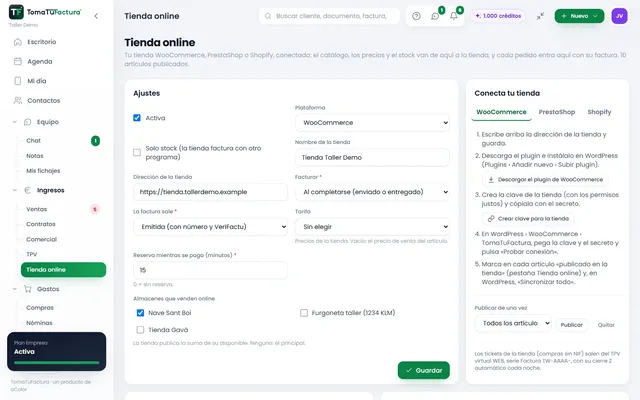
- In TomaTuFactura, Online shop › Shopify: paste the domain, the app's identifier and secret and press “Authorise in Shopify”.
- Choose the items to publish and press “Sync with Shopify”.
If your store already had a custom app created in its admin before 2026, that works too: you paste its token.
Shopify and your physical shop
With the TomaTuFactura POS you sell at the counter with the same stock as the website, with VeriFactu receipts.
The shop connection is optional for €19/month. The WooCommerce plugin and the PrestaShop module are free; Shopify connects with nothing to install.
More: online shop · WooCommerce · Shopify · PrestaShop · physical and online shop · inventory.
Questions about Shopify
Do I need to install an app from the Shopify App Store?
No: you create an app for your store in Shopify's Dev Dashboard in a few minutes and authorise it from TomaTuFactura. That way you don't give access to anyone else.
How do I add the tax ID to the Shopify checkout?
With a cart or checkout field called “NIF” (order attribute), or in the company field of the billing address: the connector reads it from both.
Does it work if my store shows prices with VAT?
Yes: the connector checks whether your store includes taxes in prices and sends the retail price with VAT or the price without VAT accordingly.
Connect your Shopify today
30 days free with the online shop and the POS included, no card.