
Stock control for WooCommerce, with an invoice for every order
Install the free TomaTuFactura plugin in your WordPress and paste the key: products, variants, prices and stock come from your software and update on their own. Every order comes in with its VeriFactu invoice and the customer downloads it from My account.
30 days free · No card · No lock-in
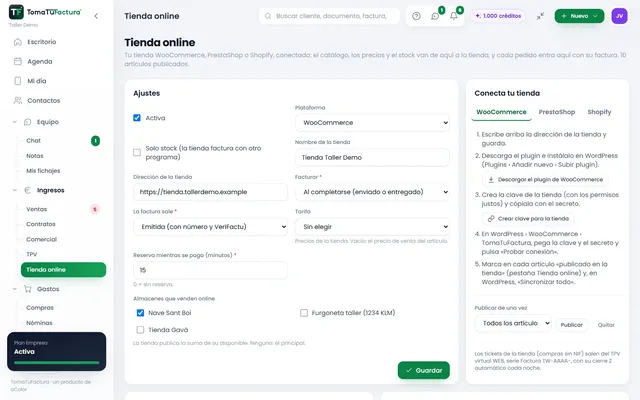
What the WooCommerce connector does
Stock and prices in real time
Every counter sale, purchase or count changes the website stock. If your hosting blocks notifications, the plugin checks every 15 minutes.
A VeriFactu invoice for every order
Receipt without tax ID or full invoice with tax ID, on payment or on completion; PDF in the order completed email and in My account.
Tax ID at checkout
Validated tax ID field in the classic and block checkout, and “I want an invoice with my details” afterwards.
Never sell what you don't have
The order reserves stock when paid and for a few minutes while paying; what sells in the physical shop disappears from the website.
Refunds that add up
A partial refund in WooCommerce creates the corrective invoice for what was returned and the goods go back to stock.
Bring your catalogue
One button creates in TomaTuFactura the products you already have in WooCommerce (by SKU, with their stock).
Invoice plugin for WooCommerce versus connector with stock
| Feature | TomaTuFactura | Invoice-only plugin |
|---|---|---|
| Invoice for every order with VeriFactu | Yes, with its record and QR | Depends on the plugin |
| Website stock from your warehouse | Yes, from one or several online warehouses | No: stock is kept in WooCommerce |
| Physical shop with the same stock | Yes, with the POS | No |
| Supplier purchases and counts | Yes | No |
| Accounting and VAT returns | Yes, with the journal entries for every order | No |
VeriFactu in WooCommerce
WooCommerce doesn't issue VeriFactu invoices on its own: you need invoicing software that generates the record with its chained hash and the QR code. With the connector, the invoice for every order is issued by TomaTuFactura, which complies with the regulation, and the PDF reaches your customer with the QR. You'll find the dates in the VeriFactu calendar.
POS for WooCommerce and your physical shop
If you also sell at the counter, the TomaTuFactura POS uses the same stock as the website: no POS plugin inside WordPress and no two inventories to reconcile.
How to connect
- In TomaTuFactura, Online shop: enter the shop address and create the key.
- In WordPress, install “TomaTuFactura for WooCommerce”, paste the key and test the connection.
- Choose which items are published and press “Sync everything”.
Download the WooCommerce plugin (.zip) · also from the Online shop screen in the software.
The shop connection is optional for €19/month. The WooCommerce plugin and the PrestaShop module are free; Shopify connects with nothing to install.
More: online shop · WooCommerce · Shopify · PrestaShop · physical and online shop · inventory.
Questions about WooCommerce
Is the plugin free?
Yes. What you pay for is the software (with the online shop module); the plugin has no cost and no paid version.
Can I have several warehouses?
Yes: you choose which warehouses sell online and the website publishes the sum of their available stock, minus the safety stock.
What about variants and bundles?
Variants go as WooCommerce variable products, each with its SKU and stock; bundles publish how many can be assembled.
What about prices with VAT?
In the software the price is without VAT and the website shows the calculated retail price with VAT. The invoice is exactly what the shop charged, to the cent.
Connect your WooCommerce today
30 days free with the online shop and the POS included, no card.