
Automaticreconciliation of what matches
Exact amount and invoice number or Tax ID: reconciled as soon as the statement arrives.
Link your accounts to your bank (PSD2, read-only), import the statement in Norma 43, Excel or CSV, or have your bank email it to you. Every transaction is matched against invoices, SEPA batches, expenses, taxes or payslips, and the rules do the rest.
30 days free · No card · No lock-in
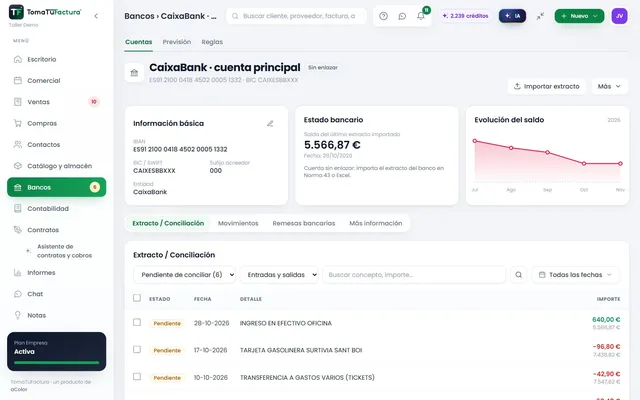
Transactions arrive by themselves twice a day and come out matched to their invoice.





Problem: You tick off the statement against your invoices in a spreadsheet.
Solution: On import, whatever matches beyond doubt is reconciled automatically: exact amount and invoice number or tax ID in the description.
Problem: You download the statement from online banking every time you want to check payments received.
Solution: You link the account via PSD2, read-only, and the balance and transactions update twice a day.
Problem: Bank charges, self-employed contributions and taxes are entered by hand every month.
Solution: Rules by description reconcile them automatically.
Problem: You know today's balance, but not whether you will be able to pay wages and form 303.
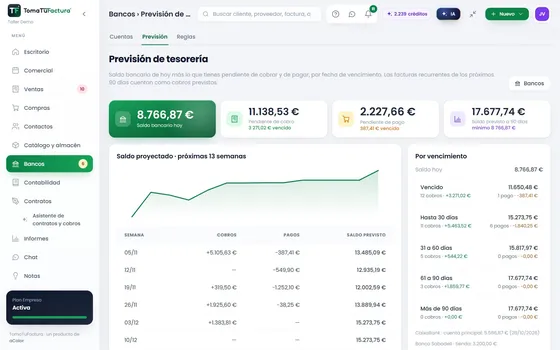
Solution: The cash-flow forecast shows the expected balance at 30, 60 and 90 days and week by week for 13 weeks.
Exact amount and invoice number or Tax ID: reconciled as soon as the statement arrives.
The AI suggests the matching invoice, journal line or purchase and tells you why.
You know in good time whether you can cover payroll and form 303.
Connection to your bank through an authorised provider (PSD2). Balance and transactions updated twice a day, with an alert when the authorisation is about to expire.
If your bank sends the statement in Norma 43 by email, it’s imported automatically. And you can always upload the file in Norma 43, Excel or CSV.
On import, only what matches beyond doubt is reconciled automatically: exact amount and the invoice number or Tax ID in the description. Everything else comes with suggestions.
By amount, invoice number, Tax ID or customer name. A batch is recognised even if the bank credits it in several deposits.
Bank fees, self-employed contributions, taxes or the software fee are reconciled automatically with rules by description.
Collections and payments of invoices, direct-debit batches (one debit per due date) and transfer batches, bounced debits with a notice to the customer, transfers between accounts, payroll and taxes.
Forecast balance at 30, 60 and 90 days and week by week for 13 weeks, from collection and payment due dates (each instalment of a 30-60-90 invoice on its own date).
What your contracts and recurring invoices generate each day, week and month: forecast, issued and collected, with your portfolio's monthly recurring revenue.
How it worksEvery reconciliation generates its journal entry: fees, taxes and transfers appear in the journal alongside sales and purchases (with accounting).
If your bank only gives you a PDF, the AI extracts the transactions and checks they match the balances before importing them.
How it worksKnowing today’s balance is easy; knowing whether on the 25th you’ll be able to pay the payroll and Form 303 is not.
The forecast starts from your account balances, adds what you're owed and subtracts what you owe, each on its due date. You see it at 30, 60 and 90 days and week by week for the next 13 weeks, and it updates itself as soon as you record a payment received or made.
For the transaction that doesn’t match: the AI suggests the matching invoice, journal line or purchase and tells you why.
How it worksYour bank only gives you a PDF: the AI extracts the transactions and checks they match the balances.
How it worksIf a supplier changes IBAN, an invoice asks for payment to a different account or arrives twice, we alert you before you pay.
How it worksPrivate AI: it runs on the manufacturer's own servers, with no third-party AI services. It always proposes; you decide.
See everything the AI doesThe connection is made under the European PSD2 regulation through an authorised provider and is read-only: we never see your credentials and cannot order payments. You can revoke it whenever you want.
Download the statement in Norma 43, Excel or CSV from your online banking and upload it, or have your bank email it to the statements inbox: repeated transactions are not duplicated.
It depends on the plan: 1 on Autónomo, unlimited on Pyme, unlimited on Empresa and unlimited on Corporativo. Accounts are counted by IBAN: two accounts at the same bank count as two.
30-minute demo or 30-day free trial with all modules. Your choice.
Download the app for free and sign in with your usual user: camera, instant alerts and offline work.
We use our own and third-party cookies to analyse the use of the website. You can accept or reject them. Cookie policy
Session, form security and remembering this choice. The site does not work without them.
Google Analytics 4: how many visits there are, where they come from and which pages and features are used, to improve the site. Cookies _ga and _ga_*.
Instagram and Facebook (Meta pixel): to know which ads lead to an enquiry or a sign-up and to show you our ads on those networks. Cookies _fbp and _fbc.
TikTok (TikTok pixel): the same with TikTok ads. Cookie _ttp.
TomaTuFactura assistant