
< 1 minper invoice
Customer, catalogue lines and issue: it comes out numbered, with its QR code and ready to send.
Quotations, orders, delivery notes and invoices chained together: every document knows where it comes from. Contracts signed by both parties, recurring invoices, 30-60-90 due dates, tracking of every collection, SEPA batches and the financial calendar with what you are going to collect, with the VeriFactu record and its QR code, in six languages and in your customer's currency.
30 days free · No card · No lock-in
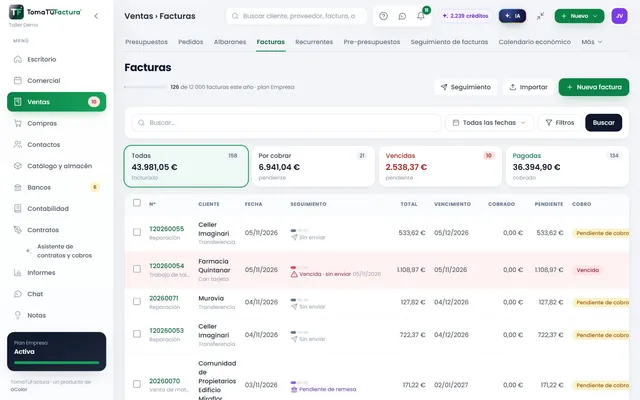
Problem: You copy the quotation into the invoice and type the same lines again.
Solution: An accepted quotation becomes an order, a delivery note or an invoice, and several delivery notes are grouped into one invoice.
Problem: Each month's fees are invoiced one by one and one of them ends up not being issued.
Solution: Recurring invoices are created automatically every week, month or year and emailed to the customer.
Problem: Overdue invoices get chased late, when someone remembers.
Solution: The unpaid invoice reminder goes out on its own, by email or WhatsApp, and invoice tracking tells you what to do with each invoice.
Problem: You make a mistake on an invoice already issued and don't know how to correct it properly.
Solution: You issue a corrective invoice linked to the original and its VeriFactu record is generated automatically.
Customer, catalogue lines and issue: it comes out numbered, with its QR code and ready to send.
Recurring invoices and contracts issue, send and collect on their own every period.
Tracking, reminders and batches: no invoice goes unchased.
An accepted quotation becomes an order, a delivery note or straight away an invoice. Several delivery notes for one customer are grouped into a single invoice.
Lines with item, discount, VAT by rate, IRPF and equivalence surcharge. Gap-free numbering by series and branch; issued invoices can’t be touched, they’re corrected with series R.
Pro forma invoices to get paid in advance, and customer advances and payments on account deducted from the invoice (from the Pyme plan).
Invoices, quotations and delivery notes created automatically every week, month or year, issued or as drafts, and emailed to the customer.
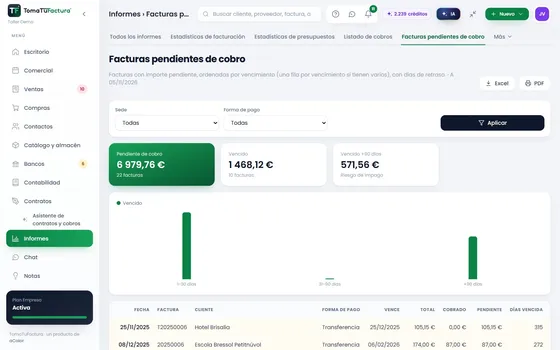
Several due dates per invoice (30-60-90, per customer or per payment method), partial collections applied to each one, cash register, overdue invoices highlighted and late-payment reminders with your template or written by the AI.
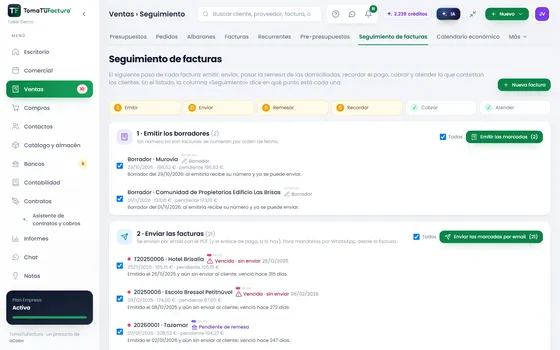
One screen with what to do next with each invoice, in order: issue, send, batch, remind, collect and reply to what the customer answers, with the button to do it at once.
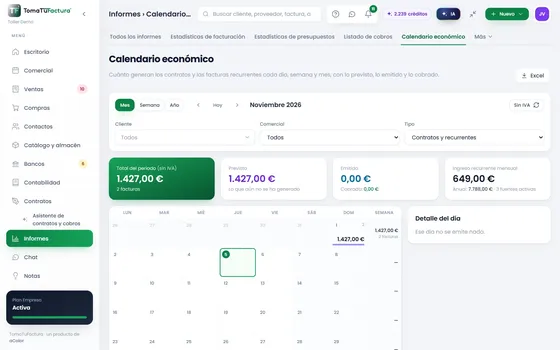
What your contracts and recurring invoices generate each day, week and month: forecast, issued and collected, with monthly recurring revenue and Excel export.
Direct debit receipts (cuaderno 19) with the mandate signed on screen, advance notice of the charge and returns; transfers to suppliers (norma 34).
Documents in another currency with the ECB rate and the equivalent in euros. PDFs and emails in Spanish, Catalan, English, French, Italian or Portuguese, depending on the customer.
Ten templates with an editor: colour, typeface, logo, columns and texts with a preview, one per document type if you like, and PDFs signed with your company's certificate.
See invoice templatesIssue, send, download as ZIP or Excel, collect or send reminders for up to 100 documents at once; and also in purchases, customers, items (raise prices by a %), recurring invoices and contracts.
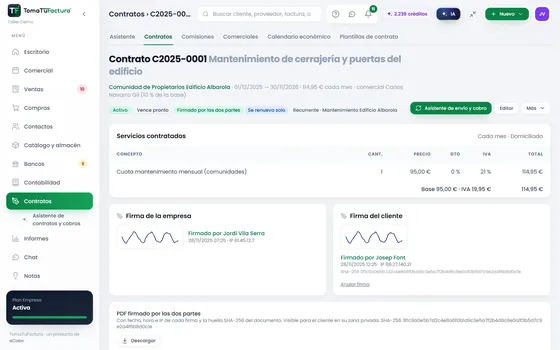
Contracts signed by the customer and the company, with their sales rep and commission (on collected or invoiced amounts); the report works out each month's figures and every sales rep has their own activity panel.
Every customer email goes out with your logo and your colour, the text in a card and the links as buttons; your templates remain just the text.
Comment on any document with your team or your accountant (with @mentions and email notification) and restore deleted items for 30 days.
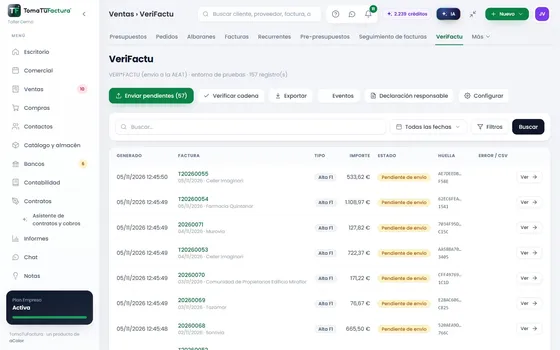
Invoicing record with chained hash and QR code on the PDF; Facturae 3.2.2 signed with DIR3, file number, contract and one payment term per due date, validated against the official schema.
See VeriFactuThe regulation requires every invoice to generate an unalterable record with a fingerprint and QR code, and for it to be kept or sent to the AEAT. Doing it by hand is not an option.
When the invoice is issued, the registration record is generated with a hash chained to the previous one, the QR code is printed on the PDF and, in VERI*FACTU mode, the record is sent to the AEAT in the background with retries. If something needs correcting, you issue the corrective invoice and the software generates the appropriate record.
Overdue invoices nobody chases in time, direct debits you have to prepare by hand on the bank's website and payments you can't match to an invoice.
Every invoice has its due date and outstanding amount. Overdue invoices show on the dashboard and in the outstanding report, the reminder goes out automatically with your template by email or WhatsApp, and direct debit receipts are generated in a SEPA batch you upload to your bank. When the money comes in, bank reconciliation marks the invoice as collected.
Draft invoices nobody issues, issued ones that were never sent, overdue ones chased too late and direct-debit receipts chased with the customer when what is missing is the batch.
The tracking screen sorts invoices by what they need next: issue, send, batch, remind, collect and reply to what customers answer. Tick the ones you want and do it at once. In the list, the "Tracking" column shows where each one stands (issued, sent, seen by the customer, collected) and filters by that step. Direct-debit invoices waiting for a batch are not chased: they are not late payments.
With contracts and fees, knowing how much comes in next month means adding up by hand what each customer owes, and nobody keeps it up to date.
Every signed contract and every active recurring invoice generates money on certain dates. The calendar places them on their day and adds them up by day, by week and by month, telling apart the forecast (not yet generated), the issued and the collected amounts, with or without VAT. At the top you see your portfolio's monthly recurring revenue; click a day and the detail appears with each customer, its concept and the link to the contract or the recurring invoice. And on the dashboard, a card with this month's and next month's totals.
The contract in Word, the customer's signature scanned, the company's still pending, and the sales rep's commission worked out by hand at the end of the month.
You write the contract with a template (services, amount, frequency, duration and renewal), send it to be signed through a link and sign it yourself on screen: the PDF keeps both signatures, their date, IP and hash, visible to the customer in their private area. The contract generates its recurring invoice with the sending and collection wizard. If it has a sales rep, their commission (percentage or fixed amount, on collected or invoiced amounts) appears in each month's commission report, and every sales rep sees their own figures in "My sales activity".
Dictate what you want or upload the customer's order and you get a draft with your customers and items.
How it worksAn email for each overdue invoice, friendly or firm as appropriate, which you read before sending.
How it worksIt answers with your figures and does things for you: it shows you what it is going to do and only does it when you press “Do it”.
How it worksPrivate AI: it runs on the manufacturer's own servers, with no third-party AI services. It always proposes; you decide.
See everything the AI doesInvoices depend on the plan: 400 invoices a year on Autónomo, 2.000 on Pyme, 12.000 on Empresa and unlimited on Corporativo. Customers: up to 100 on Autónomo and unlimited from Pyme upwards; products and services: unlimited on all plans.
Yes, from Excel or CSV, along with suppliers and issued and received invoices. During the trial we help you map the columns from your current software.
Issued invoices cannot be edited or deleted: you issue a corrective invoice (by replacement or by differences) linked to the original, and the corresponding VeriFactu record is generated automatically. We explain it on the blog: how to make a corrective invoice.
Yes. Each document can be in another currency, with the ECB exchange rate for its date and the equivalent in euros (books, forms and VeriFactu are always in euros), and the PDF and email go out in the customer's language: Spanish, Catalan, English, French, Italian or Portuguese.
Yes: you choose from ten PDF templates and adjust the colour, typeface, logo, columns and texts with the preview alongside, with one template per document type if you like. You can also add custom fields (from the Pyme plan) and sign the PDF with your company's certificate.
Yes. Each invoice can carry several due dates (for example 30-60-90 days), set automatically from the customer's or the payment method's terms, or entered by hand. Each collection is applied to its due date, the SEPA batch carries one direct debit per due date and the cash-flow forecast counts each instalment on its date.
Yes: the financial calendar places what your contracts and recurring invoices generate on its day and adds it up by day, week and month, with the forecast, the issued and the collected amounts and your monthly recurring revenue.
30-minute demo or 30-day free trial with all modules. Your choice.
Download the app for free and sign in with your usual user: camera, instant alerts and offline work.
We use our own and third-party cookies to analyse the use of the website. You can accept or reject them. Cookie policy
Session, form security and remembering this choice. The site does not work without them.
Google Analytics 4: how many visits there are, where they come from and which pages and features are used, to improve the site. Cookies _ga and _ga_*.
Instagram and Facebook (Meta pixel): to know which ads lead to an enquiry or a sign-up and to show you our ads on those networks. Cookies _fbp and _fbc.
TikTok (TikTok pixel): the same with TikTok ads. Cookie _ttp.
TomaTuFactura assistant