
Everyonewith their own role and permissions
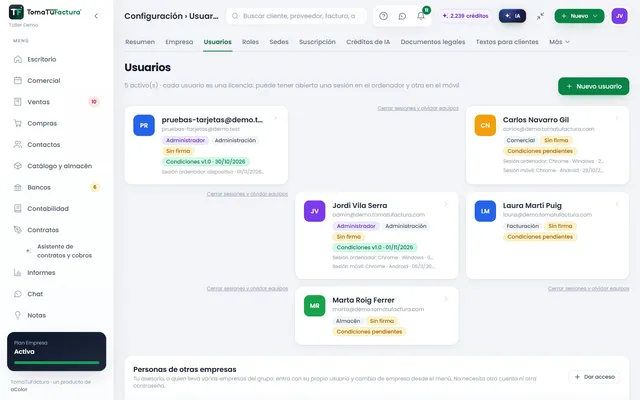
The users in your plan, the ones you add and the technician who only uses the phone, with their field licence.
Add your team with the right role for each person: administration, invoicing, sales, warehouse or accounting adviser; anyone who only uses the phone logs in as a field technician. Working time record with clock-in from the phone (included in Pyme, Empresa and Corporativo and optional for €5/month on the rest), shared notes and lists, and a history of who changed what.
30 days free · No card · No lock-in
Problem: Everyone logs in with the same user and sees everything, including what isn't theirs to see.
Solution: Each person has their role, with permissions by action, and sees only their own work, their site or their department.
Problem: Working hours are recorded on paper or in Excel and nobody fills them in properly.
Solution: Each person clocks in, takes breaks and clocks out with one button on the phone and signs their monthly summary.
Problem: Something has changed on a record and nobody knows who touched it.
Solution: Each record's history keeps who created, changed or deleted each entry, with date and time.
Problem: You run several companies and keep logging in and out of one account after another.
Solution: With a single login you switch company with a selector, and in “My companies” you see what is pending in all of them.
The users in your plan, the ones you add and the technician who only uses the phone, with their field licence.
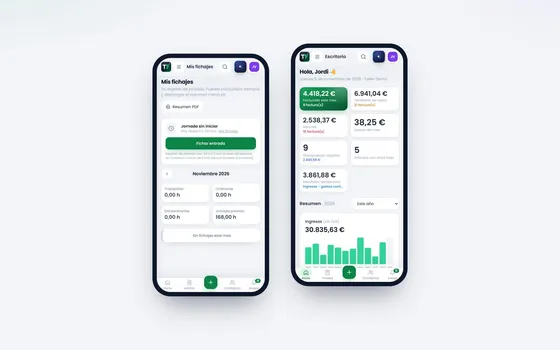
From your phone, even without signal, with the signed monthly summary.
Who created, changed or deleted each thing, with the value before and after.
Permissions by module and by action (view, create, issue, collect, delete) with default roles; on Empresa and Corporativo, custom roles too.
Each person sees only their own records, their branch’s or their department’s: in lists, records, dashboard, search and reports.
Built-in "Sales rep" role that sees its own customers and contracts (and the unassigned ones), with its "My sales activity" panel and each month's commissions per contract.
See contracts and commissionsWorking time record with clock-in, clock-out and breaks, corrections with a reason and audit trail, and a monthly summary signed by the employee.
A button on your phone, with optional geolocation and even without signal, to clock in wherever the work is done.
Read-only access for the Labour Inspectorate and export of records by person and period.
Google Keep-style notes, with checklists and colours, that you share with whoever you like; while someone is editing one, it’s locked.
Comment on invoices and documents with your team or your accountant; anyone you mention gets an email notification.
Who created, changed (with the old and new value) or deleted each record, with date and time, in each record’s history.
A person can belong to several companies with a role in each and switch between them with a selector; in ‘My companies’ they see what is pending in all of them.
The law requires recording each person's working hours, keeping the records for four years and showing them if the Labour Inspectorate asks. On paper or in Excel, nobody remembers to log them properly.
Each person clocks in, breaks and clocks out with a button on their phone. If they make a mistake, the correction is kept with its reason and who made it. At the end of the month, everyone receives their summary to sign, and the company can give the Labour Inspectorate read-only access.
Yes: it stores the start and end time of each working day, breaks and corrections with their reason for four years, and gives access to the employee, the company and the Labour Inspectorate.
No. The advisory firm signs in with their own access and the «Asesor contable» role, and your company's first advisory firm is free: it does not count towards your plan's users and is not charged. It costs them nothing either. If you add a second advisory firm, that one does count as one more user (if you already use all the users in your plan, it is charged as an additional user: 10 €/month).
Each plan includes its own: 1 in Autónomo, 2 in Pyme, 5 in Empresa and 15 in Corporativo. Each additional user costs €10/month. Anyone who only works from their phone uses the field technician licence: «My day», their appointments and work orders, clocking in and chat. They take the seats in your plan that full users are not using and, if none are left, cost €6/month (an additional full user, €10/month).
It is included in Pyme, Empresa and Corporativo and optional for €5/month on the rest.
30-minute demo or 30-day free trial with all modules. Your choice.
Download the app for free and sign in with your usual user: camera, instant alerts and offline work.
We use our own and third-party cookies to analyse the use of the website. You can accept or reject them. Cookie policy
Session, form security and remembering this choice. The site does not work without them.
Google Analytics 4: how many visits there are, where they come from and which pages and features are used, to improve the site. Cookies _ga and _ga_*.
Instagram and Facebook (Meta pixel): to know which ads lead to an enquiry or a sign-up and to show you our ads on those networks. Cookies _fbp and _fbc.
TikTok (TikTok pixel): the same with TikTok ads. Cookie _ttp.
TomaTuFactura assistant