
1 glanceto know how much comes in next month
No adding up by hand what falls due for each customer.
Every signed contract and every recurring invoice brings in money on certain dates. The financial calendar puts each one on its day and adds them up: forecast, already issued and collected, with the monthly recurring revenue of your portfolio.
30 days free · No card · No lock-in
Problem: To know how much is coming in next month, you add up by hand what falls due for each customer.
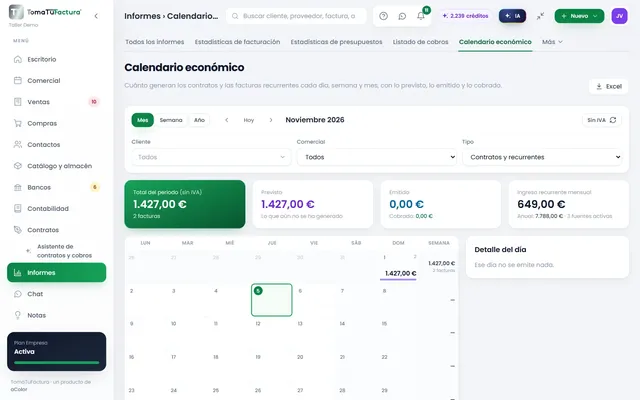
Solution: The calendar puts each amount on its day and adds it up by day, by week and by month.
Problem: You can't tell what is forecast from what you have already invoiced or collected.
Solution: Forecast, issued and collected, each in its own colour, with or without VAT.
Problem: You aren't sure how much your recurring fees bring in each month, or whether the business is growing.
Solution: At the top you see the monthly recurring revenue from all your active sources and its annual equivalent.
Problem: A total doesn't tell you which customer is paying or what for.
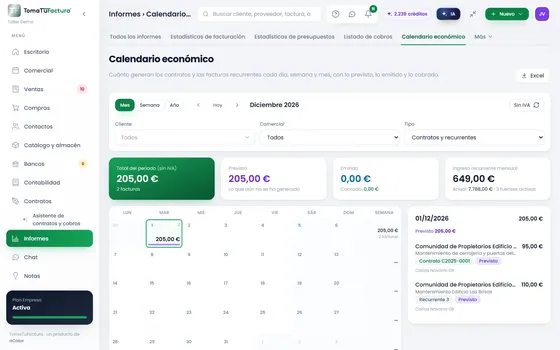
Solution: Click a day and you get the details: customer, description, amount and the link to the contract or the recurring invoice.
No adding up by hand what falls due for each customer.
What all your active fees bring in per month, and the yearly equivalent.
See how much of the forecast is already invoiced and how much is collected.
The month with each day's amount and each week's total, the week with its items and the year with its twelve months.
What hasn't been generated yet, what's already invoiced and what's already collected, each in its own colour.
Switch from one amount to the other with a click; what's collected is split in the same proportion.
Filter by a customer, by a sales rep, or contracts only or recurring invoices only.
One sheet with every item and another with each day's total.
A card with this month's and next month's total, as soon as you log in.
With fees and contracts, the question is always how much comes in next month, and the answer is scattered across recurring invoices, contracts and invoices already issued.
The calendar puts every amount on its day. In the month view you see the total for each day and each week; click a day and you get the detail: customer, description, amount and whether it comes from a contract or a recurring invoice, with a link to each. Nothing is counted twice: the forecast starts where what's already invoiced ends.
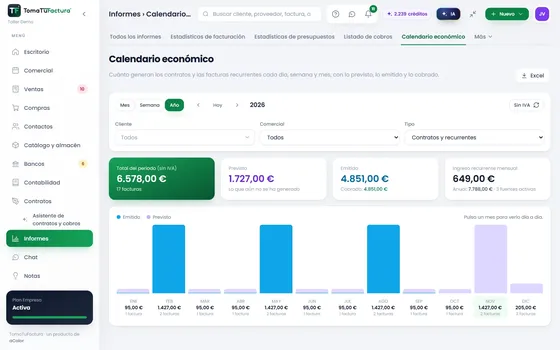
Knowing whether the business is growing means looking beyond the month: how much is committed for the rest of the year and how much your fees bring in each month.
The year view shows the twelve months with their total and the part already issued. At the top, monthly recurring revenue: what all your active sources bring in per month, whatever their frequency, and the yearly equivalent.
From your signed contracts and your active recurring invoices: their amount, frequency and next date, plus the invoices they have already generated. There is nothing to set up.
No: the financial calendar is for recurring revenue. For everything pending collection and payment, with each due date on its day, you have the cash-flow forecast.
Anyone with permission for reports can see it, and it respects the scope of their role: a sales rep only sees their own customers and contracts.
All of them, and during the free trial too.
30-minute demo or 30-day free trial with all modules. Your choice.
Download the app for free and sign in with your usual user: camera, instant alerts and offline work.
We use our own and third-party cookies to analyse the use of the website. You can accept or reject them. Cookie policy
Session, form security and remembering this choice. The site does not work without them.
Google Analytics 4: how many visits there are, where they come from and which pages and features are used, to improve the site. Cookies _ga and _ga_*.
Instagram and Facebook (Meta pixel): to know which ads lead to an enquiry or a sign-up and to show you our ads on those networks. Cookies _fbp and _fbc.
TikTok (TikTok pixel): the same with TikTok ads. Cookie _ttp.
TomaTuFactura assistant