
Same dayyour invoice gets read
What sits unread in an email inbox gets opened on WhatsApp.
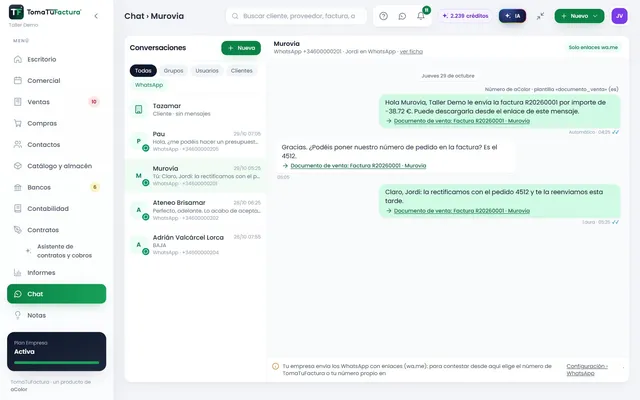
Invoices, quotations and delivery notes with the link to the PDF, signature requests and payment reminders that go out automatically. Customer replies arrive in TomaTuFactura's chat, with the status of each message.
30 days free · No card · No lock-in
Problem: The invoice sits unopened in the customer's inbox.
Solution: You send it by WhatsApp in one click, with the link to the PDF, and see whether the message has been delivered and read.
Problem: Chasing overdue invoices one by one takes time and is awkward.
Solution: Payment reminders go out by WhatsApp on their own, on the days after the due date that you choose.
Problem: The customer replies to the phone of whoever sent the invoice and the conversation gets lost.
Solution: Their reply arrives in the program's chat, with the link to their invoice, and anyone on your team with permission can see it.
Problem: You don't want a surprise over the cost of messages.
Solution: Additional messages are switched off by default and, if you switch them on, you set a maximum monthly spend.
What sits unread in an email inbox gets opened on WhatsApp.
Overdue invoices get a reminder without anyone having to remember.
What the customer replies reaches the program, not the phone of whoever sent it.
Every message carries your company's name and the link to the document in your customer's area.
With its number, the amount and the link to the PDF with the VeriFactu QR code.
See invoicingThe customer opens them from the link and accepts the quotation without calling you.
Overdue invoices are chased automatically via WhatsApp, as many days after the due date as you choose, as well as by email.
See collectionsThe link to sign the quotation, delivery note or contract from a phone.
Whatever the customer replies arrives in the app’s chat, with the link to their invoice or quotation.
If the customer replies BAJA or STOP they stop receiving messages from your company; with ALTA they receive them again.
The customer replies to the invoice's WhatsApp on the phone of whoever sent it, and the conversation gets lost among personal messages.
WhatsApp conversations are in the chat, in their own tab or alongside those from the customer area, with the customer's name, the link to their invoice or quotation and unread messages, visible to anyone on your team with permission. If the customer has written in the last 24 hours, you reply with free text from there; if not, WhatsApp only lets you write to them with a template message, which is sent from the document.
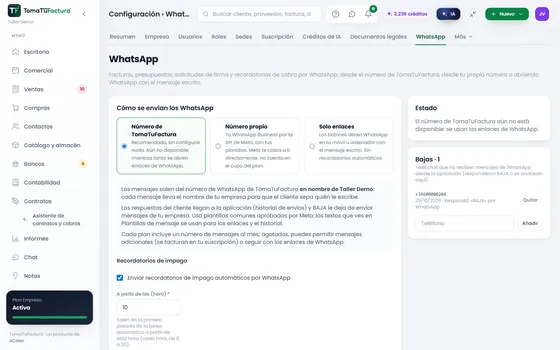
Nothing to set up: messages are sent from the TomaTuFactura WhatsApp number with your company name, with automatic payment reminders, replies in the chat and messages included each month depending on your plan.
Connect your number through Meta's WhatsApp Business API: messages go out under your name with your approved templates, with automatic reminders and replies in the chat. Meta charges you for its messages and they don't count towards your plan's allowance.
The buttons open WhatsApp on your phone or computer with the message already written, and you send it yourself. No cost, but no automatic reminders, and replies reach your own WhatsApp.
Chasing overdue invoices one by one takes time and is awkward; if it’s forgotten, payment is delayed by weeks.
In Settings › WhatsApp you choose the sending method and from what time payment reminders go out; they are sent the same number of days from the due date that you have set for email. You see the messages used this month and decide whether to allow additional ones.
The WhatsApp module is included in Empresa and Corporativo and €6/month on the other plans. With it, every plan includes a number of messages a month via the TomaTuFactura number: 25 on Autónomo, 50 on Pyme, 150 on Empresa and 500 on Corporativo. Months are calendar months and unused messages do not roll over.
| Feature | WhatsApp module | Messages included |
|---|---|---|
| Autónomo plan | +6 €/month | 25 messages a month |
| Pyme plan | +6 €/month | 50 messages a month |
| Empresa plan | Included | 150 messages a month |
| Corporativo plan | Included | 500 messages a month |
| Extra message | 0,15 € + VAT | Only if you activate them, with a maximum monthly spend |
| Your WhatsApp Business number | With the module | Meta charges you for its messages; they don’t count towards those included |
Each plan's prices are on pricing.
From the TomaTuFactura WhatsApp number, with your company's name in every message so the customer knows who is writing. If you prefer, from your own WhatsApp Business number or by opening WhatsApp with the message pre-written.
The WhatsApp module is included in Empresa and Corporativo and €6/month on the other plans. During the 30-day trial it is switched on.
Messages a month via the TomaTuFactura number: 25 on Autónomo, 50 on Pyme, 150 on Empresa and 500 on Corporativo. They are counted per calendar month. See the pricing.
0,15 € + VAT each. They are off by default: they are only sent if the administrator turns on «Allow additional messages» in Settings › WhatsApp, where a monthly spending cap can also be set. We alert you at 80 % and 100 % of the included messages and when the spending cap is reached, and they are charged on the next invoice of your subscription. There are no additional messages during the free trial.
If you haven't activated extras, automatic reminders stop until the following month and the buttons open WhatsApp with the message already written for you to send. Nothing is charged.
Those sent from the TomaTuFactura number and accepted by WhatsApp. Replies you write from the chat, messages you receive, those from your own WhatsApp Business number and links do not count.
Yes, from the chat, if the customer has written to you in the last 24 hours: that is WhatsApp's rule. After that you can only write to them with a template message, which is sent from the invoice or document.
They stop receiving WhatsApp messages from your company (also with STOP); if they reply ALTA, they receive them again. The opt-out is kept in the opt-out list, where you can also add one by hand.
You connect it with your Meta account details and your approved templates. Sending, reminders and replies work the same way; Meta charges you for its messages and they do not count towards your plan's allowance.
30-minute demo or 30-day free trial with all modules. Your choice.
Download the app for free and sign in with your usual user: camera, instant alerts and offline work.
We use our own and third-party cookies to analyse the use of the website. You can accept or reject them. Cookie policy
Session, form security and remembering this choice. The site does not work without them.
Google Analytics 4: how many visits there are, where they come from and which pages and features are used, to improve the site. Cookies _ga and _ga_*.
Instagram and Facebook (Meta pixel): to know which ads lead to an enquiry or a sign-up and to show you our ads on those networks. Cookies _fbp and _fbc.
TikTok (TikTok pixel): the same with TikTok ads. Cookie _ttp.
TomaTuFactura assistant