
9 formscalculated automatically
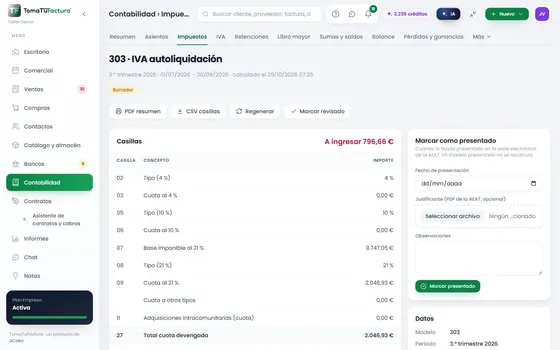
303, 130, 111, 115 and 349 every quarter and the annual 390, 190, 180 and 347.
Forms 303, 130, 111, 115, 349, 390, 190, 180 and 347 are generated from your invoices and expenses on every plan. And full accounting (from the Pyme plan): the Spanish SME chart of accounts (PGC), automatic journal entries from sales, purchases, collections, payments and bank, books, balance sheets, depreciation and financial year-end closing.
30 days free · No card · No lock-in
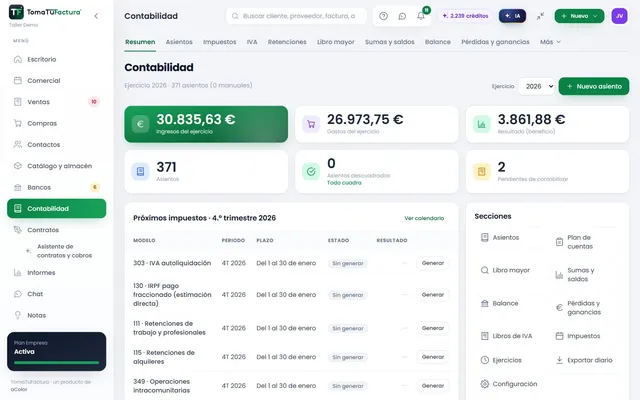
Problem: You gather issued and received invoices for your accountant the week before the 20th.
Solution: You open the form, choose the quarter and every box is filled in from the VAT ledger.
Problem: You don't know accounting and journal entries sound like another language.
Solution: Every invoice, collection, payment and reconciliation generates its own journal entry, with the chart of accounts preloaded.
Problem: Someone changes an invoice from a quarter that had already been filed.
Solution: Once form 303 is filed, no invoices can be issued with a date in that quarter, and purchases show a warning.
Problem: You email your invoices to your accountant at the end of the quarter.
Solution: Your accountant logs in with their own access and exports to A3, ContaPlus or Excel.
303, 130, 111, 115 and 349 every quarter and the annual 390, 190, 180 and 347.
Every invoice, collection, payment and reconciliation generates its own.
They review inside the program or import it into A3 and ContaPlus.
303, 130, 111, 115 and 349 every quarter and the annual 390, 190, 180 and 347, calculated box by box, with PDF and CSV and their status (draft, reviewed, filed).
Output and input VAT, withholdings applied and borne, and fixed asset register, with export to Excel.
Every invoice, collection, payment, batch, payslip and reconciliation generates its journal entry, linked to its source. Manual and recurring entries, which can be duplicated as templates.
With ticking off, a search for discrepancies and a warning if the 303 doesn't match accounts 477 and 472.
Balance sheet and profit and loss in PGC format, by period and compared with the previous year.
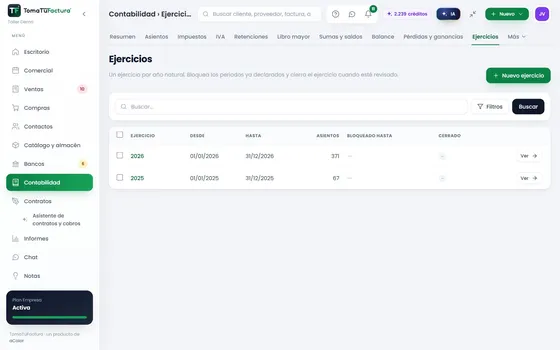
Asset registration, year-by-year depreciation schedule and depreciation entries when closing the financial year or whenever you like.
Automatic regularisation, closing and opening (and reopening if needed), and the corporate income tax instalment payment.
Once the 303 has been filed, no invoices can be issued dated in that quarter and purchases trigger a warning: what has been declared stays put.
Your advisory firm signs in with their own access (it costs them nothing and in your company it does not take a seat: the first advisory firm is free) and exports to A3 (SUENLACE.DAT or Importia Excel), ContaPlus or Excel and CSV.
Gathering issued and received invoices, reconciling VAT with the statement and sending everything to the accountant the week before the 20th.
Your invoices and expenses are already in the books. Open the form, choose the quarter and every box comes out filled in from the VAT book; review the flagged differences, mark it as filed and download the PDF and the CSV with the boxes for the AEAT online office, or your accountant files it from their own access.
Year-end closing is usually a week of manual journal entries: depreciation living in an Excel file, regularisation, closing and opening of the next financial year.
You register each fixed asset with its date, value and useful life, and the software calculates the depreciation schedule year by year and records it in the fixed asset register. When closing the financial year it generates the depreciation entries, the regularisation, the closing and the opening of the following year; if something needs correcting, you reopen it.
Before the 303: duplicates, expenses without receipts, withholdings or EU VAT, ranked and explained.
How it worksThe account from the chart of accounts, the withholding and whether the VAT is deductible, depending on the expense and the supplier.
How it worksIt answers with your figures and does things for you: it shows you what it is going to do and only does it when you press “Do it”.
How it worksPrivate AI: it runs on the manufacturer's own servers, with no third-party AI services. It always proposes; you decide.
See everything the AI doesNo. You invoice and record expenses; journal entries are generated automatically with the preloaded chart of accounts. Manual accounting is there for those who want it, but it does not get in the way.
It calculates each form box by box and gives you the PDF and the CSV with the boxes to file it on the AEAT e-office, or for your accountant to file it from their own access. Filing directly from the software is not available.
The tax forms and the VAT and withholding books, produced from your invoices and expenses. Full accounting (journal entries, journal, general ledger, balance sheets, depreciation and year-end closing) is from the Pyme plan.
Yes: they can review inside TomaTuFactura or export the journal to ContaPlus, A3 or Excel whenever it suits them.
30-minute demo or 30-day free trial with all modules. Your choice.
Download the app for free and sign in with your usual user: camera, instant alerts and offline work.
We use our own and third-party cookies to analyse the use of the website. You can accept or reject them. Cookie policy
Session, form security and remembering this choice. The site does not work without them.
Google Analytics 4: how many visits there are, where they come from and which pages and features are used, to improve the site. Cookies _ga and _ga_*.
Instagram and Facebook (Meta pixel): to know which ads lead to an enquiry or a sign-up and to show you our ads on those networks. Cookies _fbp and _fbc.
TikTok (TikTok pixel): the same with TikTok ads. Cookie _ttp.
TomaTuFactura assistant