
Your firm's tool for looking after your clients
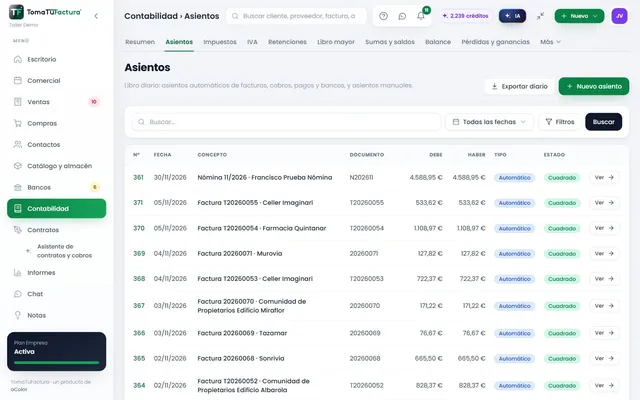
You get into your clients' companies with your accounting firm access, for free: you review what's already recorded, with expenses read by AI and their receipt, you produce the quarterly tax forms and export to A3 or ContaPlus. If your clients come from another program, we move their data for them.
30 days free · No card · No lock-in
What it saves you
Multi-company dashboard
All the client companies that have authorised you, in one list, with what is pending review in each.
Journal entries already done
Sales, purchases, collections, payments and bank posted by the client themselves as they work. You review, you don't type.
Quarterly forms
303, 130, 111, 115, 349 and the annual forms calculated box by box, with discrepancies flagged before closing.
Export to your software
Invoices, VAT and journal lines to A3 (SUENLACE.DAT or Importia Excel), and the journal to ContaPlus or to Excel and CSV, with the bank entries.
Full expenses
The customer takes the photo on the spot; the invoice arrives already read, with deductible VAT and the PDF attached. No more “I'm missing receipts”.
Locked periods
You close the quarter and your client cannot touch what has already been filed; corrections go into the open period.
We don't leave you alone with the switch
We move your clients' data
If they come from another program or a spreadsheet, we move each company's customers, suppliers, items with their stock and invoices for them, for free.
We help you get started
A person from aColor helps you with the first sign-ups and with your clients' questions, so each company arrives ready to review.
Support with a response time
Reply in under 1 hour during business hours and priority around tax deadlines.
You decide who pays each client's subscription
Some firms prefer each client to sign up and pay on their own, and others want to handle everything from the firm.
Both work, and your access is free either way. If you sign your clients up from your accounting firm dashboard, you choose their plan and licences and see what it will cost before confirming; we invoice their subscriptions to you, with a 20% discount on the list price and with the payment method of your own subscription. How you pass it on is up to you: the list price, another price or within your fees.
- Your accountant access to each client, free and from day one
- Your own panel: each client’s plan, what you pay per month, renewals and invoices
- Client sign-up wizard: plan, licences and final price before confirming
- 20% discount on every invoice of your clients, for as long as they stay with you
How to start
-
1
Create your firm’s account
Like any company: 30 days free, no card needed. If you already have one, just log in.
-
2
Get into your clients
Each client gives you access with the «Asesor contable» role and you see them in “My companies”, with what is pending in each one. The first accounting firm in each company is free.
-
3
Send us their data
If they come from another program, send us their exports in Excel or CSV and we import them, for free.
-
4
If you like, handle their subscriptions
Activate your accounting firm dashboard and sign your clients up with the wizard: we invoice them to you, with your discount.
Clients with their paperwork in order
Expenses read with their account suggested, and the quarter reviewed before it reaches your firm.
Quarter review
Before the 303: duplicates, expenses without receipts, withholdings or EU VAT, ranked and explained.
How it worksInvoices and receipts read with AI
Photo or PDF from the supplier: amounts, VAT, withholding and lines are read automatically. You review and confirm.
How it worksExpense account and IRPF suggested
The account from the chart of accounts, the withholding and whether the VAT is deductible, depending on the expense and the supplier.
How it worksPrivate AI: it runs on the manufacturer's own servers, with no third-party AI services. It always proposes; you decide.
See everything the AI doesQuestions from accounting firms
Do I have to pay anything to get into my clients?
No. The first accounting firm in each company gets in for free, with its own access and the «Asesor contable» role, and doesn't take a seat in your client's plan. If that company already has another accounting firm, your access counts as one more user and the client's administrator authorises it.
Can I export to A3 or ContaPlus?
Yes. Invoices, VAT and entries go to A3 (SUENLACE.DAT or Importia Excel) in every plan, and the journal to ContaPlus or Excel when the client keeps the accounts (from the Pyme plan). It works one way: what you change in your program does not come back to TomaTuFactura.
Will you move my clients' data?
Yes, for free. If your clients come from another program or a spreadsheet, you send us each company's export in Excel or CSV and we move their customers, suppliers, items with their stock and issued and received invoices, plus the bank transactions in Norma 43. We let you know when each company is ready.
Who pays for my customers' subscription?
You decide. Your client can sign up and pay for their subscription on their own, and your access is still free. Or you handle it from your dashboard: then we invoice it to you, with a 20% discount on the list price for everything they take (plan, users, modules, credit packs and usage) for as long as they stay with you, and with the payment method of your own subscription. Your client gets no invoices from TomaTuFactura; what you charge them is agreed between you.
Do I know what I will pay before registering a client?
Yes. Before you confirm, the sign-up wizard shows you the list price of the chosen plan and licences, your discount and what you will pay each month (and each year if you choose annual billing), with and without VAT. In your dashboard you see what you pay per client each month and when each one renews.
What does my client see?
Their complete company, with all the users and modules of their plan. In “My subscription” they see it is paid by their accounting firm: they see none of our invoices, because those are yours, and whatever they add (plan, users or modules) is invoiced to you and shows in your panel. You can also change it yourself from their record, and they can switch to paying it themselves whenever they want.
What if a client already uses TomaTuFactura?
You send them an invitation from your panel. If their administrator accepts it, you take over their subscription (we invoice you from the next invoice) and access their company with your accountant access.
Shall we talk?
We will show you the accountant panel with a sample company and answer your questions. Or activate it yourself in a minute from your account.