
AI
0receipts typed in
Photo, PDF or forwarded email: the AI reads the supplier, amounts, VAT and withholding.
Supplier invoices, receipts and payslips are read by AI from the PDF, the photo or the email you forward: supplier, base, VAT, withholding and lines. You review, confirm, and the expense is already posted and ready for Form 303.
30 days free · No card · No lock-in
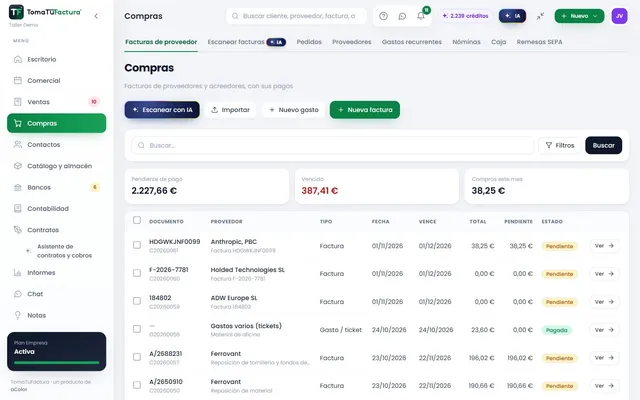
Problem: Receipts pile up and at the end of the quarter they have to be typed in one by one.
Solution: You take the photo and the AI reads supplier, net amount, VAT and withholding; you review and confirm.
Problem: Invoices that arrive by email have to be downloaded and uploaded one by one.
Solution: You forward them to your company's expenses address and they go into the scanning tray on their own.
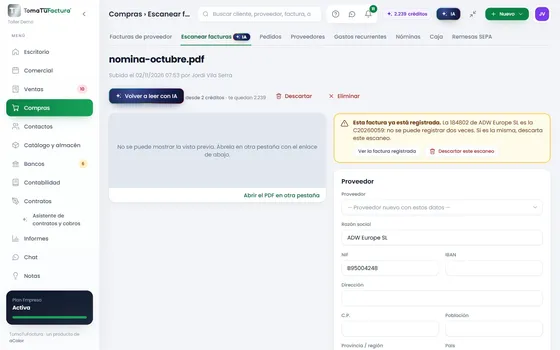
Problem: You record the same invoice twice without noticing.
Solution: It warns you before you confirm if the tax ID and number, or the date and amount, match one already recorded.
Problem: A long-standing supplier asks you to pay into a new account.
Solution: It warns you if the IBAN on the invoice is not the one on the supplier's record.
Photo, PDF or forwarded email: the AI reads the supplier, amounts, VAT and withholding.
An IBAN different from the usual one, one changed recently or a duplicate invoice: we stop you in time.
Every confirmed expense is posted, with its VAT in the VAT book.
Upload the PDF or take a photo with your phone (iPhone HEIC too): the invoice is read automatically and goes into a field-by-field review tray. It flags duplicates.
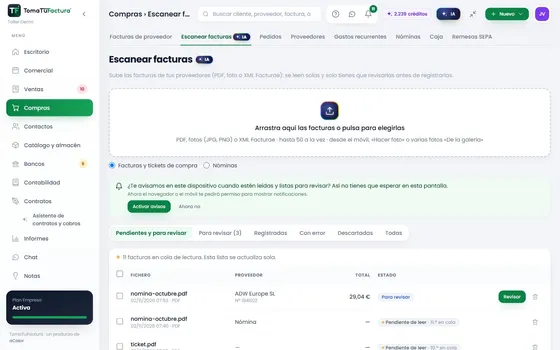
Each company has its own email address: forward the invoices you receive by email there and they go straight into the scanning tray.
Totals by VAT rate and IRPF, due dates and lines linked to items that update the purchase cost and book stock into the warehouse.
You enter the total including VAT and the base is calculated; the supplier is created on the fly and you choose whether it's paid or pending, with its ledger account.
Payslip records with gross pay, IRPF, Social Security and net pay; they go straight into Forms 111 and 190 and can be scanned too.
Rent, fees or insurance recorded automatically every month, with their supplier, account and VAT.
Purchase order with partial receipt that updates warehouse stock when the goods arrive (with the inventory module).
Partial payments, transfer batches (norma 34) and reconciliation when the charge appears at the bank.
Facturae e-invoices sent to you by your suppliers are recorded automatically, with no scanning at all.
The shoebox full of receipts and the end-of-quarter afternoon typing them one by one into your accountant's spreadsheet.
You take the photo, the AI suggests the supplier, amounts and VAT, you confirm and the expense is posted to its PGC account with the input VAT in the book. The payment later appears in the bank ready to reconcile.
Half of all purchase invoices arrive by email: electricity, phone, software, your regular supplier. Downloading them and uploading them one by one is yet another chore.
Each company has its own expenses address. Forward the email (or set a rule in your mailbox to forward it automatically) and the attachments go into the scanning tray, are read by AI and wait for you to review them. From your phone, you can also share a PDF directly with the app.
The invoice reads itself, the account and withholding are suggested and, if the IBAN isn't the usual one, we warn you before you pay.
If a supplier changes IBAN, an invoice asks for payment to a different account or arrives twice, we alert you before you pay.
How it worksPhoto or PDF from the supplier: amounts, VAT, withholding and lines are read automatically. You review and confirm.
How it worksThe account from the chart of accounts, the withholding and whether the VAT is deductible, depending on the expense and the supplier.
How it worksPrivate AI: it runs on the manufacturer's own servers, with no third-party AI services. It always proposes; you decide.
See everything the AI doesPDFs, photos (JPG, PNG, HEIC) and Facturae e-invoices from your suppliers. Several invoices in one PDF are split into separate invoices.
Yes, from the Pyme plan: you connect your Google Drive, choose a folder and whatever you leave in it (from the computer, the mobile app or “Save to Drive” from your email) reaches the scanning inbox on its own every few minutes, each file once. We only ask for read permission: we don't change or delete anything in your Drive.
Yes: if the Tax ID and number match an invoice already recorded, or the date and amount do, it warns you before you confirm. And also if the invoice asks for payment to an IBAN different from the one on the supplier record.
Each scan uses AI credits depending on the file (a PDF with text costs less than a photo). Plans include 100 AI credits a month on Autónomo, 300 in Pyme, 1.000 in Empresa and 3.000 in Corporativo, which comfortably cover a normal business's expenses. If you need more in a given month, you buy a pack of extra credits (250 credits for €5, 1.000 for €15 and 5.000 for €60 + VAT): extra credits never expire, they are only used once the month's credits run out. Facturae e-invoices from your suppliers are read without AI and use nothing.
Yes. You add employees and record each payslip (gross, IRPF, Social Security and net), by hand or by scanning it. They flow automatically into forms 111 and 190 and, with accounting, generate their journal entry. The number of employees on the payroll depends on the plan.
30-minute demo or 30-day free trial with all modules. Your choice.
Download the app for free and sign in with your usual user: camera, instant alerts and offline work.
We use our own and third-party cookies to analyse the use of the website. You can accept or reject them. Cookie policy
Session, form security and remembering this choice. The site does not work without them.
Google Analytics 4: how many visits there are, where they come from and which pages and features are used, to improve the site. Cookies _ga and _ga_*.
Instagram and Facebook (Meta pixel): to know which ads lead to an enquiry or a sign-up and to show you our ads on those networks. Cookies _fbp and _fbc.
TikTok (TikTok pixel): the same with TikTok ads. Cookie _ttp.
TomaTuFactura assistant