
2 tapsto charge a receipt
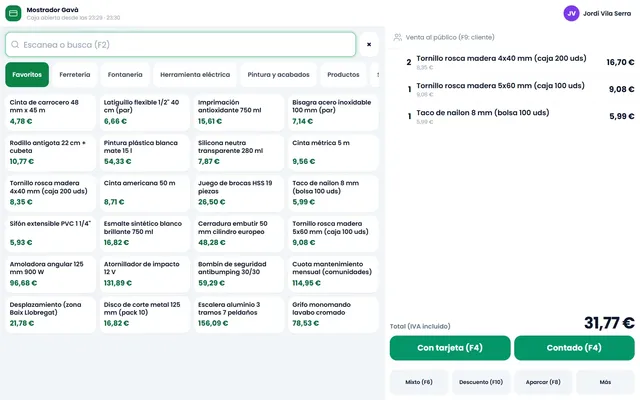
You scan, tap «Card» and the receipt comes out with the VeriFactu QR and deducts the stock.
Cloud POS software for your shop: it works on the till's tablet, computer or phone, with nothing to install. You scan, charge by card or cash and the receipt comes out with its VeriFactu QR, deducts the stock from the shop's warehouse and goes into the accounts. Each cashier signs in with their PIN; at the end of the day, the Z close with cash count in three screens.
30 days free · No card · No lock-in
Problem: Everyone uses the same password at the till and nobody knows who gave each discount.
Solution: Each cashier logs in with their PIN, and discounts, cancellations and cash counts are in the report by cashier.
Problem: You count the till with a calculator and note the discrepancy in a notebook.
Solution: You count the cash, the program tells you the expected amount and the difference, and the Z report comes out with its journal entry.
Problem: What you sell at the counter isn't deducted from stock until someone notes it down.
Solution: Each receipt deducts stock from the shop's warehouse and warns you if there is none left.
Problem: The customer asks for an invoice with their details after taking the receipt.
Solution: The receipt is exchanged for a full invoice with their details in a moment.
You scan, tap «Card» and the receipt comes out with the VeriFactu QR and deducts the stock.
Each person signs in with their PIN and does not count as a user of your plan.
You count, see the difference and the Z close comes out with its journal entry: no sheets or sums.
Scan the barcode (or search, or tap the family) and charge with «Card» in one tap or in cash with the change calculated. Split payment, line and overall discounts, and VAT-inclusive prices to the cent.
Each receipt is a simplified invoice with its series, its VeriFactu record and its QR. If the customer asks for a full invoice, it is exchanged with their details in a moment.
Each person signs in with their 4 to 6 digit PIN, without email or password, and does not count as a user of your plan. The supervisor authorises discounts, voids and returns.
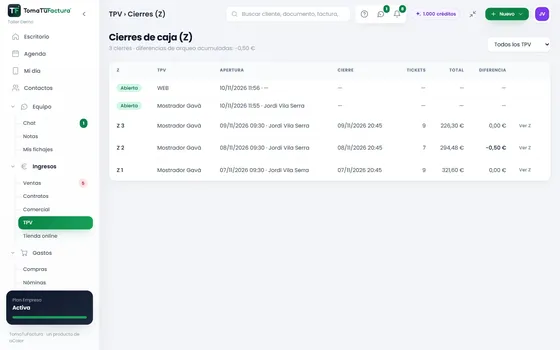
Opening float, cash in and out, cash count (blind too), discrepancy tolerance and Z close with its report, its summary journal entry and the automatic close at midnight.
Full return or of some lines, in cash, card or voucher; the corrective invoice is issued by itself and the goods go back to the warehouse. The voucher is spent on the next purchase.
Park the sale of a customer who forgot something and carry on with the next one; what is parked reserves the stock until it is recovered.
Each POS sells from its warehouse; families and subfamilies on screen, packs that deduct their components and a warning if there is no stock.
Tablet, computer or phone: it is linked with a code and then the PIN is enough. Bluetooth receipt printer from Android, customer display and kiosk mode.
Sales by POS, day and hour, by cashier (discounts, voids and cash counts), by payment method and best sellers, and the Z closes of each till.
A shared password at the till, discounts nobody knows who gave and a cashier you pay for as one more user of the software.
You add each cashier with a PIN (no email or password) and set their maximum discount. At the till, they tap their name and type the PIN; if they leave, the screen locks by itself. Anything beyond their limits is authorised by a supervisor with their PIN on the same screen, and everything stays in the per-cashier report.
Counting the till with a calculator, writing the discrepancy in a notebook and then entering the day's sales into the accounts.
When closing, you count the cash (note by note if you like), the software tells you what was expected and the difference and, if it exceeds the tolerance, asks for the reason. The Z report comes out with sales by payment method, VAT and cashier, the day's summary journal entry and what you take to the bank. If someone forgets, the till closes by itself at midnight.
How much did the downtown shop sell yesterday? Which cashier gives the most discounts? Ask in plain language and the AI looks it up in your receipts and closes.
It answers with your figures and does things for you: it shows you what it is going to do and only does it when you press “Do it”.
How it worksBefore the 303: duplicates, expenses without receipts, withholdings or EU VAT, ranked and explained.
How it worksPrivate AI: it runs on the manufacturer's own servers, with no third-party AI services. It always proposes; you decide.
See everything the AI doesNo. The POS works in the browser of the till's tablet, computer or phone. You link it once with a code and from then on it opens straight on the PIN screen.
The POS is added separately on any plan: 18 €/month with one till (the module and its first POS) and 9 €/month for each extra till. Cashiers with a PIN are free. With the Shop pack (inventory, POS and online shop together, with 10 €/month off), a shop on the Pyme plan with one till pays 69 €/month, billed monthly and excluding VAT.
Yes. Each receipt is a simplified invoice with its VeriFactu record, its chained fingerprint and its QR, in each POS's own series. Returns are issued as corrective invoices.
Any barcode reader that works as a keyboard. For the receipt, the computer's printer or, on Android, a 58 or 80 mm Bluetooth thermal printer. You can also send the receipt by email or WhatsApp.
Yes. Each POS has its series, its outgoing warehouse, its cashiers and its till; the reports compare them.
Yes, for retail: we explain it for clothing shops, for greengrocers, butchers and bakeries with a scale and, in general, in POS software and POS with VeriFactu.
30-minute demo or 30-day free trial with all modules. Your choice.
Download the app for free and sign in with your usual user: camera, instant alerts and offline work.
We use our own and third-party cookies to analyse the use of the website. You can accept or reject them. Cookie policy
Session, form security and remembering this choice. The site does not work without them.
Google Analytics 4: how many visits there are, where they come from and which pages and features are used, to improve the site. Cookies _ga and _ga_*.
Instagram and Facebook (Meta pixel): to know which ads lead to an enquiry or a sign-up and to show you our ads on those networks. Cookies _fbp and _fbc.
TikTok (TikTok pixel): the same with TikTok ads. Cookie _ttp.
TomaTuFactura assistant