
Up to datestock, without noting it down
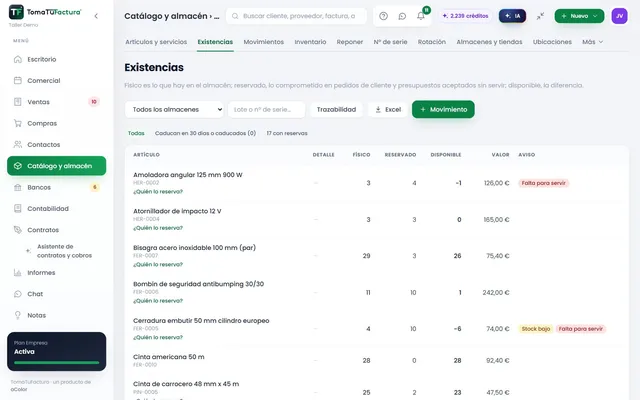
The delivery note deducts stock and the purchase replenishes it: no separate spreadsheet to keep.
Items and services with cost, margin, retail price and price lists; variants (size, colour…) and serial numbers; several warehouses with locations; orders and accepted quotations that reserve stock; batches and expiry dates; minimum stock with a replenishment proposal and automatic purchase orders; turnover and stocktakes with adjustments. Delivery notes deduct stock and purchases restock it.
30 days free · No card · No lock-in
Problem: You realise an item is missing when the customer is already asking for it.
Solution: An alert when stock falls below the minimum and a suggested order to the usual supplier, which you create in one click.
Problem: Stock is kept on a separate sheet that is never up to date.
Solution: The delivery note deducts stock and the purchase replenishes it, without noting it anywhere else.
Problem: The same T-shirt in four sizes is four different items.
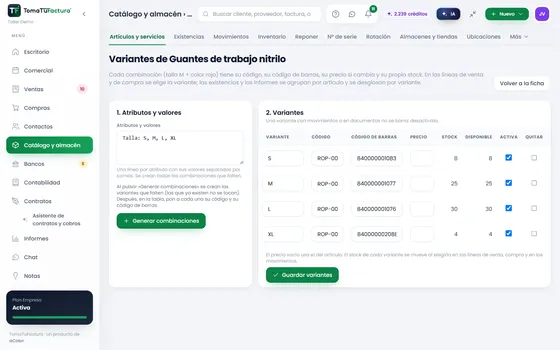
Solution: One item with variants: each size or colour with its code, its barcode and its own stock.
Problem: A warranty claim arrives and nobody knows the serial number of the unit sold.
Solution: You search for the serial number and see where it is, who it was sold to, when and on which document.
The delivery note deducts stock and the purchase replenishes it: no separate spreadsheet to keep.
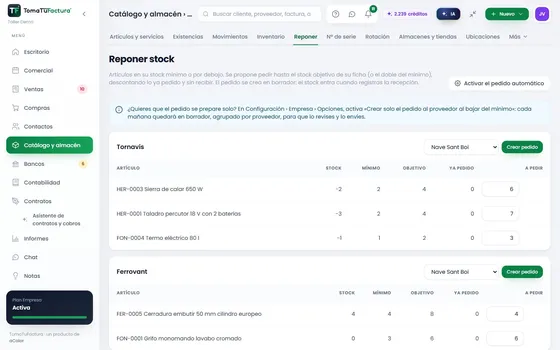
An alert when stock drops below the minimum, with the supplier order already prepared.
Who it was sold to, when and on which document.
Categories with default margin, cost, retail price, VAT, barcode and usual supplier, on every plan.
Price lists per customer with a general discount and quantity-based tiered prices, applied automatically when invoicing.
Customer orders and accepted quotations reserve stock: you see the physical, reserved and available quantity of each item, and who reserves each unit. Every document tells you what will happen to the stock before you save it.
Sizes, colours or finishes generated as combinations, each with its own code, barcode, optional price and stock; you pick them in sales and purchase lines.
One number per unit on every inbound and outbound movement, with its history: where it is, who it was sold to, when and in which document.
Shop, central warehouse, vehicle or industrial unit, each with its own stock, its locations (aisle, shelf, bin) and transfers between them. A site's sales come out of its own warehouse.
Movements with batch and expiry date, alerts for items expiring soon and traceability of which customers each batch went to.
Minimums per item, a warning when they are reached and a purchase order proposal to the usual supplier in one click; if you enable it, the order is created by itself as a draft up to the target stock. It is never sent on its own.
Sold, purchased, average stock, days of stock and what has not moved for months (tied-up value), per warehouse and in Excel.
Stock count by warehouse with automatic adjustment of differences and stock valuation at cost, also in Excel.
Find and add items to delivery notes and invoices with a barcode scanner or your phone's camera.
Items from Excel or CSV with their opening stock per warehouse, and catalogue export whenever you need it.
You notice an item is out of stock when the customer is already asking for it, and supplier orders are placed from memory.
Each item has its minimum stock. When stock falls below it, the dashboard alerts you and the reorder screen suggests how much to order from each usual supplier, taking into account what is already reserved by customer orders. You review the suggestion and the purchase order is created with one click; when the goods arrive, stock is replenished automatically.
The same T-shirt in four sizes as four different items, and a sold device whose serial number nobody knows when the warranty claim arrives.
You define the item's attributes (size: S, M, L, XL; colour: red, blue) and the program generates the combinations, each with its own code, barcode, price if it differs and its own stock; in sales and purchase lines you pick the variant or read it with the scanner. If the item carries a serial number, every inbound movement asks for the numbers and every outbound one assigns them: in "Serial numbers" you look one up and see where it is, who it was sold to, when and in which document.
Upload the order your customer sends you as a PDF and you get a draft with your items and your prices.
Dictate what you want or upload the customer's order and you get a draft with your customers and items.
How it worksIt answers with your figures and does things for you: it shows you what it is going to do and only does it when you press “Do it”.
How it worksPrivate AI: it runs on the manufacturer's own servers, with no third-party AI services. It always proposes; you decide.
See everything the AI doesNo. Services do not move stock; the catalogue is still useful for having prices and descriptions ready when you invoice.
Stock control (warehouses, stock, batches, orders and counts) is an optional module at €12/month, included in Corporativo. The catalogue of items and services is included on all plans.
Yes, from Excel or CSV, with opening stock per warehouse.
Yes. An item can have variants (size, colour, finish…), each with its own code, barcode and stock, and it can carry a serial number per unit, with the traceability of each number from the moment it comes in until the customer it was sold to.
30-minute demo or 30-day free trial with all modules. Your choice.
Download the app for free and sign in with your usual user: camera, instant alerts and offline work.
We use our own and third-party cookies to analyse the use of the website. You can accept or reject them. Cookie policy
Session, form security and remembering this choice. The site does not work without them.
Google Analytics 4: how many visits there are, where they come from and which pages and features are used, to improve the site. Cookies _ga and _ga_*.
Instagram and Facebook (Meta pixel): to know which ads lead to an enquiry or a sign-up and to show you our ads on those networks. Cookies _fbp and _fbc.
TikTok (TikTok pixel): the same with TikTok ads. Cookie _ttp.
TomaTuFactura assistant