
AI
Photoand the expense is in
The receipt goes straight to the AI scanning tray.
TomaTuFactura installs on iPhone, Android and your computer from the browser, with its own icon and in full screen. Snap the receipt, prepare the quotation at the customer's premises, clock in and get alerts; if you lose signal, whatever you do is sent when you're back online.
30 days free · No card · No lock-in
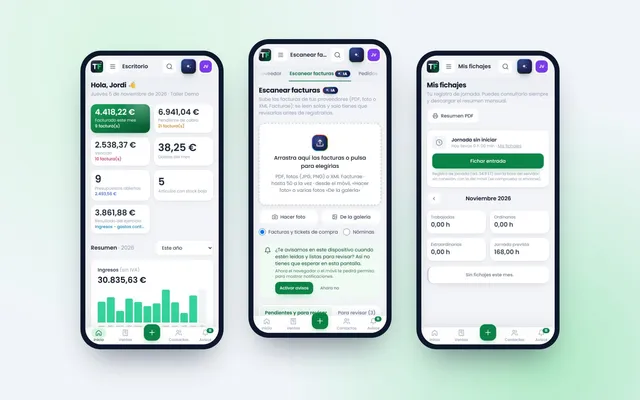
Problem: The lunch receipt gets lost before it reaches the office.
Solution: You take a photo of it with your phone and it goes straight to the AI scanning tray.
Problem: Just when you have to clock in or note something down, you lose signal.
Solution: What you do offline is saved on the phone and sent automatically when the signal returns, with nothing duplicated.
Problem: You prepare the quotation back at the office and the customer has already gone cold.
Solution: You do it on your phone at the customer's premises, they sign on the screen and you send it by WhatsApp before you leave.
Problem: You find out about a payment or an accepted quotation the next day.
Solution: An instant notification on your phone: invoice paid, quotation accepted or a message from a customer.
The receipt goes straight to the AI scanning tray.
What you do is saved and sent automatically when you're back online.
Payments received, accepted quotations and messages from your customers.
Download it free on your iPhone or Android and sign in with your usual user. If you prefer, it can also be installed from the browser (Safari or Chrome) and on your computer.
The “Take photo” button sends the expense to the AI scanning tray. And a PDF that reaches your phone can be shared straight to the app.
Quotation or invoice from your phone, customer signature on screen and sent via WhatsApp before you leave.
Clock in, upload expense photos, prepare quotes, pro formas and draft invoices and, with work orders, fill in and sign today's ones offline: everything is sent when you are back online.
See work ordersInvoice paid, quotation accepted or rejected, message from a customer, scanned invoice ready and anti-fraud alerts. Each person chooses which ones.
Clock-in, breaks and clock-out from your phone, with optional geolocation (with time tracking).
An alert with the invoices due today, the bank transactions to reconcile and, when it's time, the 303 deadline.
Scans barcodes to add items to a delivery note or take inventory.
One session on mobile and another on the computer per person: if someone logs in on another phone, you get an alert and the previous session is closed.
Just when you need to clock in or note down the quotation, your phone loses signal and the app won't load.
Whatever you do offline is saved on your phone and sent automatically when you’re back online, without duplicating anything. Quotations and invoices arrive as drafts without a number: VeriFactu requires the invoice to be numbered and chained when it is issued, so you issue it afterwards, once connected. If anything has changed in the meantime (a customer or an item deleted), it explains what happened.
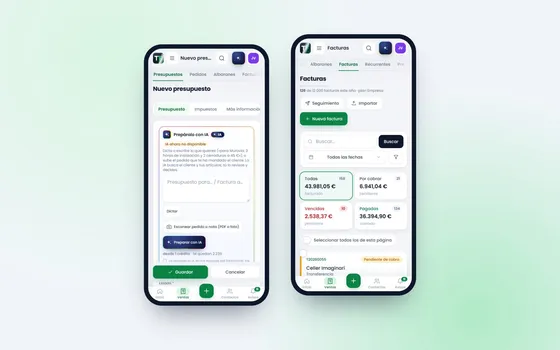
Photo or PDF from the supplier: amounts, VAT, withholding and lines are read automatically. You review and confirm.
How it worksDictate what you want or upload the customer's order and you get a draft with your customers and items.
How it worksIf a supplier changes IBAN, an invoice asks for payment to a different account or arrives twice, we alert you before you pay.
How it worksPrivate AI: it runs on the manufacturer's own servers, with no third-party AI services. It always proposes; you decide.
See everything the AI doesNo. It is included in every plan, with the same users and permissions as on the computer.
Yes, on both: download it free from the App Store (iPhone and iPad) or Google Play (Android) and sign in with your user. It can also be installed from your phone's browser, and it works the same.
You can prepare them: they are saved as drafts and sent when you are back online. Issuing them (giving them a number and their VeriFactu record) requires a connection, because the law requires each invoice to be chained to the previous one at the moment it is issued.
30-minute demo or 30-day free trial with all modules. Your choice.
Download the app for free and sign in with your usual user: camera, instant alerts and offline work.
We use our own and third-party cookies to analyse the use of the website. You can accept or reject them. Cookie policy
Session, form security and remembering this choice. The site does not work without them.
Google Analytics 4: how many visits there are, where they come from and which pages and features are used, to improve the site. Cookies _ga and _ga_*.
Instagram and Facebook (Meta pixel): to know which ads lead to an enquiry or a sign-up and to show you our ads on those networks. Cookies _fbp and _fbc.
TikTok (TikTok pixel): the same with TikTok ads. Cookie _ttp.
TomaTuFactura assistant