
2 signaturesand the contract is in force
The customer signs on their phone and you sign on screen; you keep the PDF with both signatures.
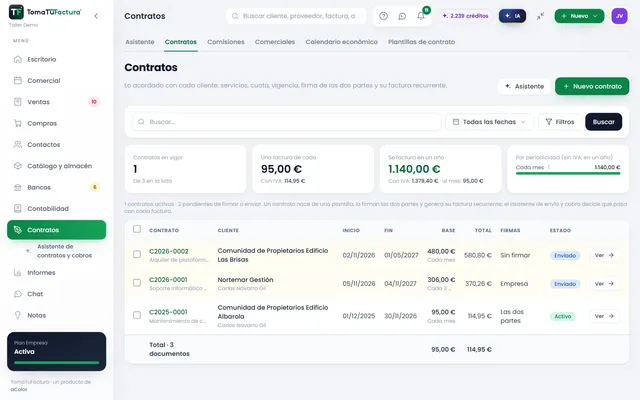
Draft the contract from your templates, send it for signature by link and sign it yourself on screen. Once signed, it creates its recurring invoice, alerts you to renewals and expiry dates and works out each sales rep's commission.
30 days free · No card · No lock-in
Problem: You send the contract as a PDF and wait for them to print it, sign it and scan it.
Solution: The customer signs it via a link from their phone and you sign on screen; you get the PDF with both signatures.
Problem: Once the contract is signed, someone has to remember to invoice the fee every month.
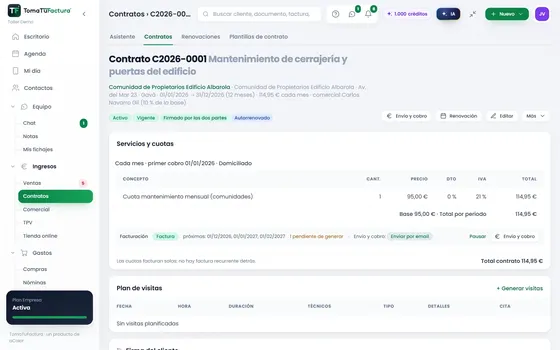
Solution: On signing, the contract creates its recurring invoice with the agreed frequency and payment method.
Problem: A renewal date slips by and you find out when the contract has already expired.
Solution: Automatic renewal or 60 days' notice, and contracts expire on their own on their end date.
Problem: At the end of the month you add up by hand what each salesperson is owed.
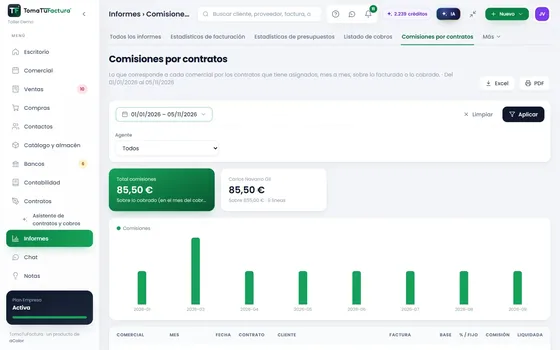
Solution: Each month you get every salesperson's statement, on amounts collected or invoiced, with a report and CSV.
The customer signs on their phone and you sign on screen; you keep the PDF with both signatures.
The signed contract creates its recurring invoice, with its sending and its collection.
Every month, what each sales rep is due, on what was collected or invoiced.
Texts with variables for customer, services, amount, frequency, duration and renewal: two built in, plus your own.
The customer signs by link, by WhatsApp or in their customer area; the company, on screen. With date, time, IP address and document fingerprint.
Once signed, the contract creates its recurring invoice with the agreed frequency and payment method.
Automatic renewal or 60 days' notice, termination and contracts that expire by themselves on their date.
Sales rep per customer and per contract, a "Sales rep" role that only sees its own work and the "My sales activity" dashboard.
Percentage or fixed amount per invoice, on what's collected or invoiced, with monthly statement, report and CSV.
Sending the contract as a PDF, waiting for it to be printed, signed and returned as a scan, and finding your own signature missing the day you need to show it.
You send the contract by email or WhatsApp and the customer signs it on their phone; you sign it on screen. The software stores the date, time, IP address and fingerprint of each signature and generates the PDF with both, which the customer sees in their customer area. Once sent or signed, a contract's text and lines can no longer change.
At month end, adding up by hand what each sales rep brought in and arguing over which invoices count.
Each contract has its sales rep and its commission: a percentage or a fixed amount per invoice. By default it is calculated on what has been collected; if you prefer, on what has been invoiced. Every month you get each sales rep's statement with their invoices, and each one sees their own on their dashboard.
Who signed, the date and time, the IP address and the fingerprint of the signed document; the PDF carries both signatures and the customer downloads it from their customer area. It is an electronic signature with evidence, not a signature with a qualified certificate.
Yes. You create your templates with variables for the customer, services, amount, frequency, duration and renewal, and the contract fills them in by itself. There are two built-in templates to get you started.
If it renews automatically, it carries on; if not, it alerts you 60 days ahead so you can renew it or let it expire, and its recurring invoice stops on the end date.
Yes: contracts, commissions and the "Sales rep" role are in every plan. The sales agenda is a separate module.
30-minute demo or 30-day free trial with all modules. Your choice.
Download the app for free and sign in with your usual user: camera, instant alerts and offline work.
We use our own and third-party cookies to analyse the use of the website. You can accept or reject them. Cookie policy
Session, form security and remembering this choice. The site does not work without them.
Google Analytics 4: how many visits there are, where they come from and which pages and features are used, to improve the site. Cookies _ga and _ga_*.
Instagram and Facebook (Meta pixel): to know which ads lead to an enquiry or a sign-up and to show you our ads on those networks. Cookies _fbp and _fbc.
TikTok (TikTok pixel): the same with TikTok ads. Cookie _ttp.
TomaTuFactura assistant